Would you like to reinstall your Windows RDP or change its version? You've come to the right place.
First of all, you need to know that you won't be able to keep your data. So make a backup first!
Let's take a look at how to install Windows Server 2022. This tutorial also works for other versions of Windows Server.
Step 1 : Go in 'ISO Images"

Step 2: Choose the Windows Version you want and click on "Mount Iso". For this exemple i will choose Windows Server 2022.

Step 3: Restart your VPS

Step 4: Go in your Console

Step 5: Choose your language, click on "Install Now" and then choose Windows Server 20xx Standard(Desktop Edition), Accept Terms and choose "Custom" Install.
Step 6: Keep your console Open and your RDP open, go in your ISO Section on your UebuHost Client Area and mount the latest version of the "virtio-win-" ISO.

Step 7: Go back to your console and click on "Load Driver".
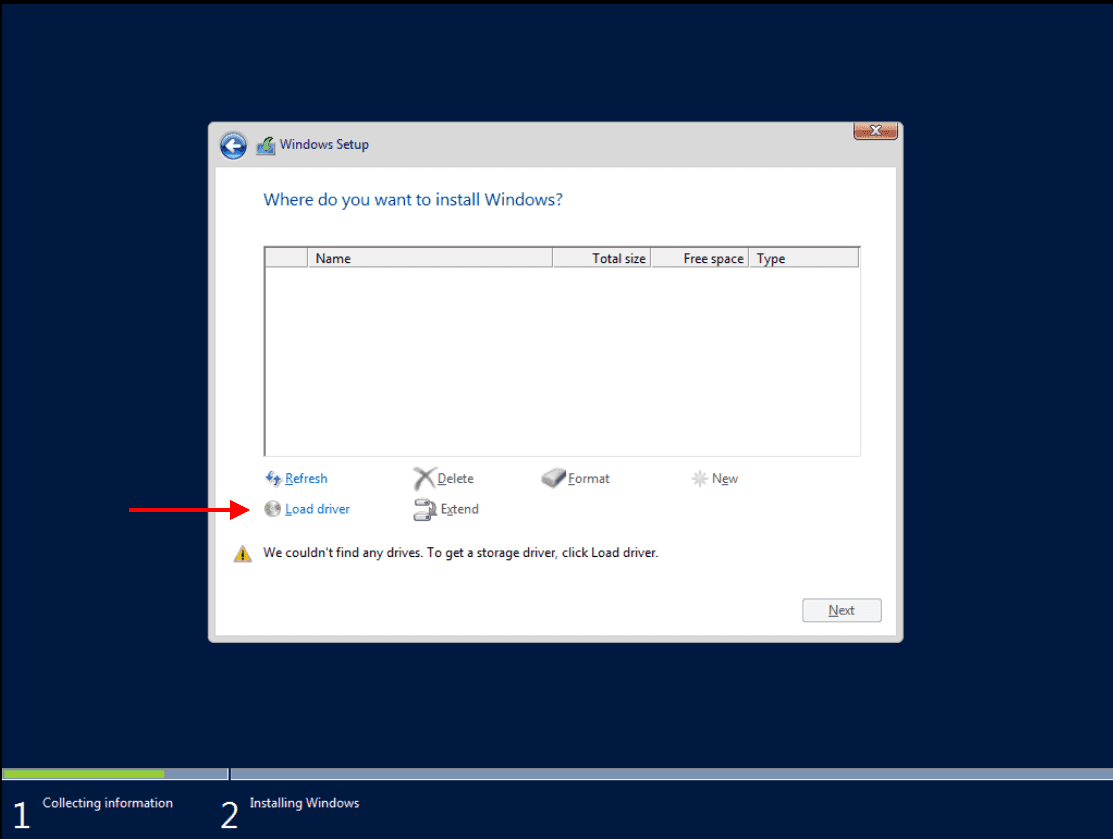
Choose the CD Drive and look for 3 folder :
- Balloon
- NetKVM
- vioscsi
Go each time in the folder, for exemple Baloon and choose the folder for your windows Server version (2019 = 2k19, 2016 = 2k16, 2022 = 2k22) and inside, select "amd64" folder and then click on OK.
Then, Click on Next to install the Baloon driver. You will come back to the last page. Click again on "Load Driver" and do it for NetKVM and vioscsi.

Once you've installed the 3 drivers, go back to your "ISO Images" section in your UebuHost customer area and re-assemble your Windows server image (the same one you chose at the start).
Step 8: You should see some disks appear. Select all disks 1 by 1 and click "Delete" for each one.

Next, select the only one remaining and follow the step on the screen.

Then click Next and wait for Windows to install, and you're ready to use your Windows RDP!
BONUS: DON'T FORGET TO MAKE IT ACCESSIBLE VIA WINDOWS REMOTE DESKTOP
To do this, connect via your "Console" to your Windows RDP


And now you can connect via RDP to your new Windows remote computer!